AI-Assisted Room Layout — 6 Prompts for a 4×5 m Living Room
Use six room layout prompts to place a TV, sofa, coffee table, reading corner, lighting, and storage in a 4×5 m living room.
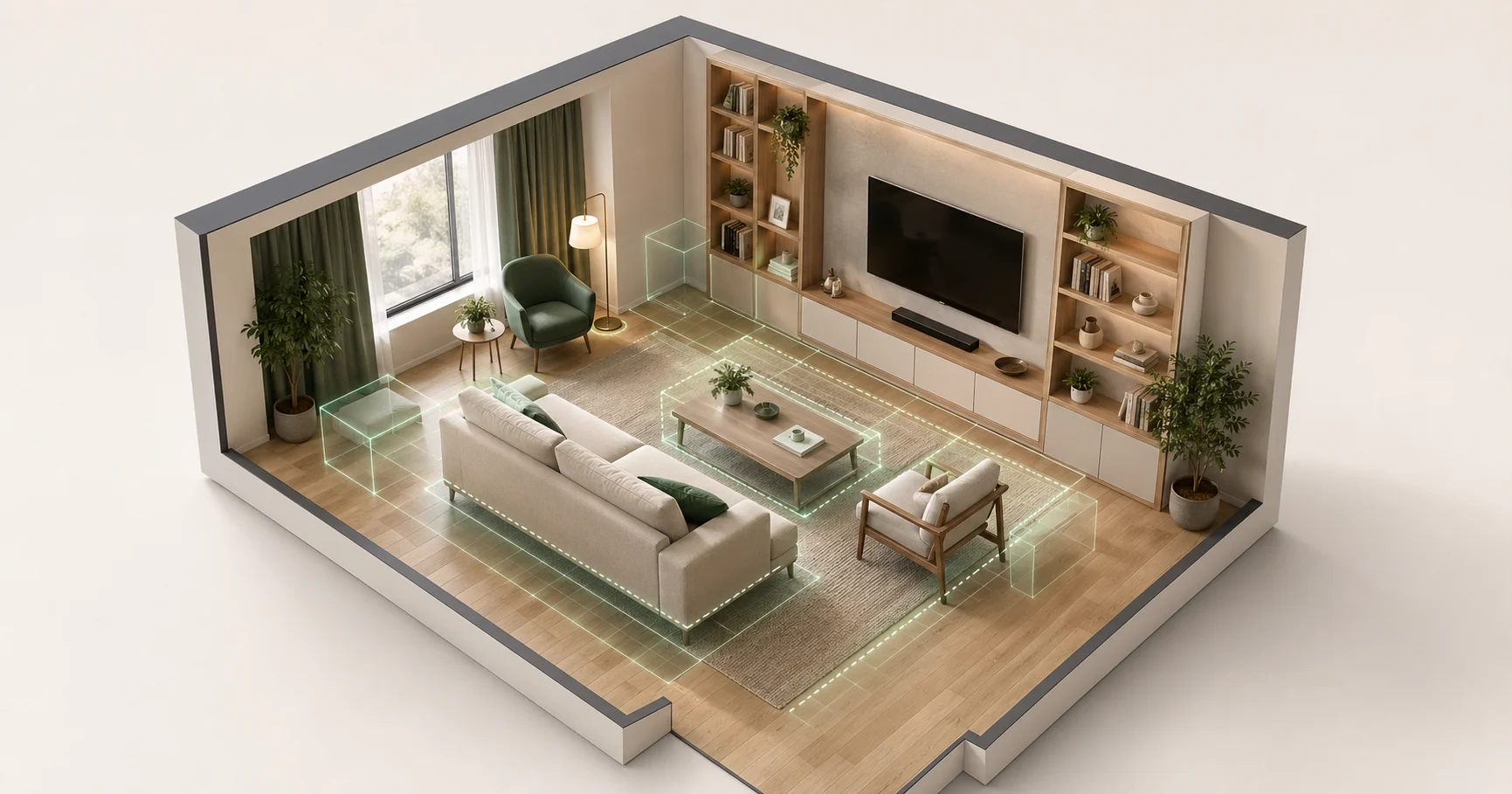
AI room planners are useful only when they respect the room that already exists: wall length, window position, door swing, and walking clearance. This walkthrough uses Aedifex's AI assistant on one specific 4×5 m living room and keeps the prompts short enough to reuse.
Starting Point
A 20 m² living room, 2.7 m ceiling. One window on the south wall (2 m wide). Door on the north wall. Concrete floor (rental), white paint walls.
We want a setup that:
- Seats four people comfortably
- Has a TV mountable on a wall
- Includes a small reading corner
- Doesn't block the window
Prompt 1: Establish the Anchor
"Add a TV to the wall opposite the window."
The AI reads the scene, identifies that the south wall has the window, and places a 55-inch TV centered on the north wall at standard mounting height.
Lesson: Start with the largest visual anchor. Everything else positions relative to it.
Prompt 2: Seating
"Add a 3-seat sofa facing the TV with about 2.5 meters between them. Add an armchair perpendicular to the sofa."
The AI places a sofa parallel to the TV at 2.5 m distance (it understands "between them" as TV-to-sofa-front, not TV-to-sofa-back). The armchair goes at the right end of the sofa, perpendicular, creating an L.
This is the moment to check whether the tool understands relationships, not just object names. The sofa, TV, and armchair need to form one seating group rather than three unrelated placements.
Prompt 3: Coffee Table
"Coffee table between sofa and TV, leaving 40 cm walking space on each side."
The 40 cm is intentional — it's the standard clearance for stepping over. The AI places a 90×50 cm coffee table at the right distance from the sofa (50 cm, also standard).
If you don't specify, the AI will use defaults that match interior design norms. If you want something specific, say so.
Prompt 4: Reading Corner
"Set up a reading corner in the south-east corner: a comfortable chair, side table, floor lamp."
The AI groups three items in the corner:
- A swivel armchair angled toward the window (not directly facing it — so the reader gets light over their shoulder)
- A 40 cm side table to the chair's right
- A floor lamp behind and to the left of the chair
The lamp position is the useful detail. It lands behind and to the side of the angled chair, where it can light a book instead of merely decorating the corner.
Prompt 5: Iterate
"The sofa feels too far from the window. Move it to allow more light to reach the seating area."
The AI nudges the sofa about 30 cm closer to the window — not so close that it blocks the radiator below — and rotates it 5 degrees toward the window. Subtle but right.
Prompt 6: Storage
"Add some bookshelves on the wall behind the TV, framing it on both sides."
Two tall, narrow shelves appear, one on each side of the TV. The AI sized them to leave about 30 cm of negative space around the TV, which is more elegant than shelves directly touching the TV.
What the AI Didn't Get Right
- It initially placed a rug under the coffee table only, not extending under the sofa front legs. We had to ask: "Make the rug bigger so it goes under the front legs of the sofa." It complied.
- It didn't suggest a side table next to the sofa for drinks. We had to ask explicitly.
- The first TV size was 65 inches; we asked for 55, it adjusted.
The AI is a fast layout sketch tool, not a replacement for judgment. It gets you to a plausible draft quickly; you still steer rug size, side tables, sightlines, and personal habits.
Total Time: 12 Minutes
From empty room to a walkable 3D layout. The value is not that the first result is perfect; it is that spacing mistakes become visible before anyone buys furniture.
Try It Yourself
Open the demo, draw four walls, then run the six prompts in order. If the result feels close, sign up to save it and continue refining dimensions.
For the technical fundamentals, see How WebGPU Makes Browser 3D Work. For tool comparison, see Aedifex vs SketchUp.
Prompting Tips That Changed the Result
The most useful prompts included a relationship and a constraint. "Add a sofa" is vague. "Add a 3-seat sofa facing the TV with about 2.5 meters between them" gives the assistant an object, orientation, and distance. That prevents the layout from becoming a loose collection of furniture.
Use measurements when they matter and plain language when they do not. A prompt like "leave 80 cm for the main path from the door to the window" is better than "make it spacious" because the tool can test the clearance. But for mood, "make the reading corner quieter and warmer" is enough; the AI can respond with lamp placement, rug size, and chair angle.
One prompt should change one idea. If you ask for a larger rug, more storage, different lighting, and a new sofa direction in the same message, you make it harder to judge what improved the room. Iterating in small steps keeps the layout understandable.
What to Check Manually
After the AI draft, walk the room at human eye level. Check whether the sofa blocks the window path, whether the armchair feels stranded, and whether the TV is visible without turning every seat into a theater row. Also open a few imaginary drawers and doors. A plan can look good from above while failing in daily use.
For this 4x5 m room, the final manual edits were small: a larger rug, one sofa side table, and a slightly narrower bookcase pair around the TV. Those edits matter because they turn a plausible AI arrangement into a livable room. The best workflow is not "AI decides"; it is "AI drafts, then the person tests."